RealmLoginKit 0.1.4
| 测试已测试 | ✓ |
| Lang语言 | SwiftSwift |
| 许可证 | 自定义 |
| 发布最近发布 | 2017年12月 |
| SwiftSwift 版本 | 3.0 |
| SPM支持 SPM | ✗ |
由Tim Oliver,Realm Inc.,JP Simard,Tim Oliver,Jason Flax,Realm CI,RealmConverter,David Spector维护。
| 依赖项 | |
| Realm | >= 0 |
| TORoundedTableView | >= 0 |
RealmLoginKit 0.1.4
- 由
- Realm
Realm 登录组件
适用于实现 Realm 移动平台的应用的通用帐户登录用户界面。
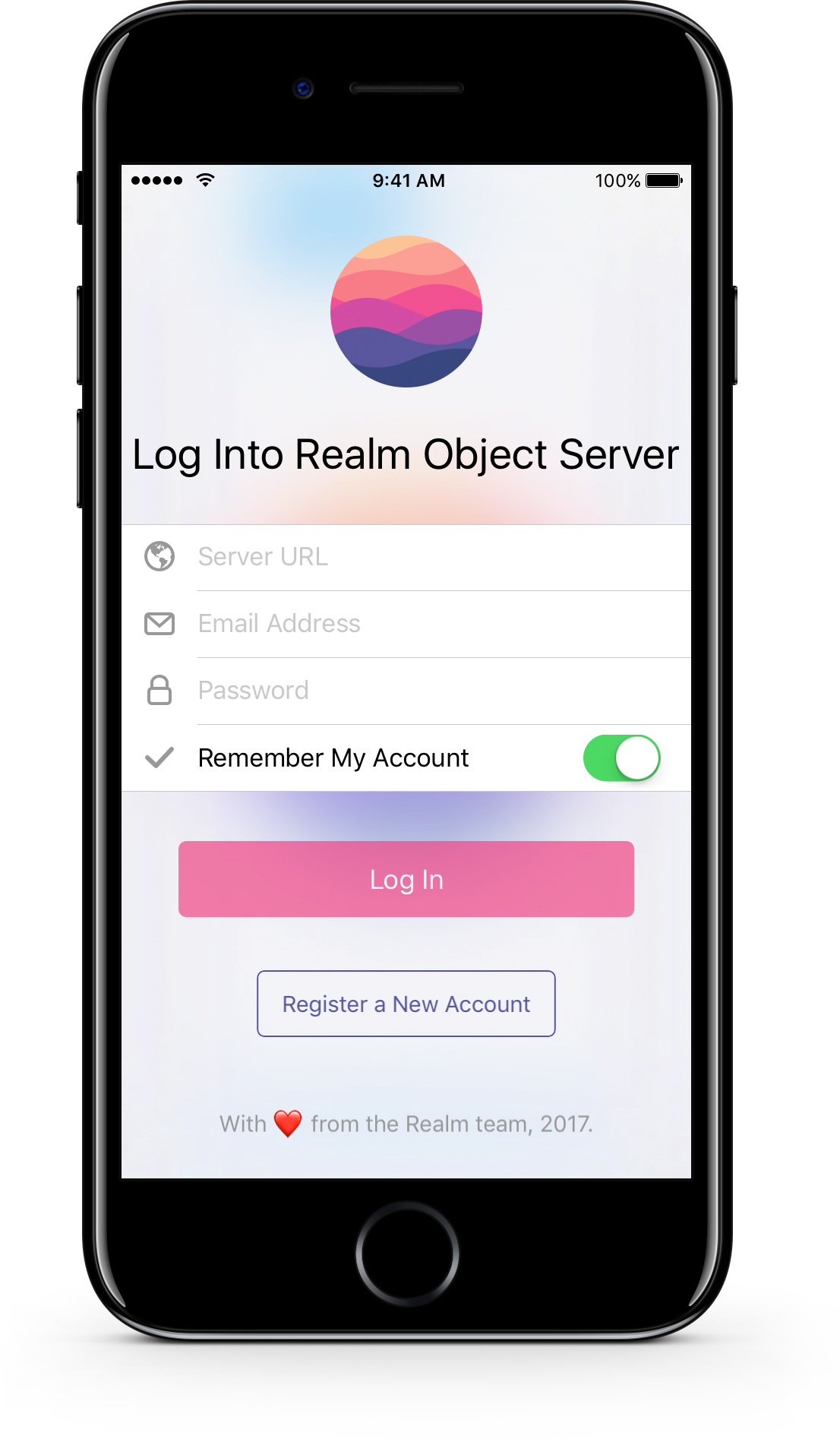


Realm 登录组件是一个 UI 框架,为使用 Realm 移动平台的应用提供了完整的登录屏幕。
它被设计成可以轻松地集成到现有的应用代码库中,并提供一个完整的功能界面,允许用户在该应用中登录或注册新帐户。
功能
- 适用于像 Realm Draw 这样的浅色应用和像 Realm Tasks 这样的深色应用的光亮和深色主题。
- 完全适应智能手机和平板电脑屏幕尺寸。
- 轻松切换“登录”和“注册”模式。
- 可选设置以隐藏服务器 URL 和“记住我”表单字段。
- 具有存储用户名和密码以供后续应用启动的功能。
版本和要求
Realm LoginKit 目前仅支持 iOS。
iOS
- Xcode 8.0 及以上
- iOS 9.0 及以上
Android
目前正在开发中,并将很快完成。
Xamarin
已在路线图上,开发即将开始。
第三方依赖
iOS
- Realm Objective-C - Realm 移动数据库的 Objective-C 版本。
- TORoundedTableView - 一个继承自
UITableView的子类,当在 iPad 上查看时会创建圆形表格部分。
示例代码
Swift
// Create the object
let loginController = LoginViewController(style: .lightTranslucent) // init() also defaults to lightTranslucent

// Configure any of the inputs before presenting it
loginController.serverURL = "localhost"

// Set a closure that will be called on successful login
loginController.loginSuccessfulHandler = { user in
	// Provides the successfully authenticated SyncUser object
}
Objective-C
// Create the object
RLMLoginViewController *loginController = [[RLMLoginViewController alloc] initWithStyle:LoginViewControllerStyleLightTranslucent];

// Configure any of the inputs before presenting it
loginController.serverURL = @"localhost";

// Set a closure that will be called on successful login
loginController.loginSuccessfulHandler = ^(RLMSyncUser *user) {
	// Provides the successfully authenticated RLMSyncUser object
};
设置演示应用
iOS
为了运行 Realm LoginKit 演示应用,需要安装 CocoaPods 以集成第三方库。
- 如果您还没有安装,请安装 CocoaPods。
- 打开终端,转到 Realm Puzzle 目录的根目录,例如
cd ~/Projects/realm-loginkit。 - 运行
pod install以安装 Realm LoginKit 需要的依赖项。 - 打开
RealmLoginKit.xcworkspace而不是xcproject文件。
安装
iOS
CocoaPods
CocoaPods 是将 Realm LoginKit 安装到应用程序中的推荐方式,因为它将自动管理回收 Realm Objective-C 作为依赖项。在您的 PodFile 中,只需添加 pod 'RealmLoginKit'。
Realm LoginKit 也支持第三方认证提供商。但是,由于这些提供商可能需要额外的依赖项,而这些依赖项可能被视为冗余,因此它们被隔离在独立的 CocoaPods 子规范中
- Amazon Cognito -
pod 'RealmLoginKit/AWSCognito'
手动操作
您也可以手动集成 Realm LoginKit;只需将 RealmLoginKit 文件夹复制到您的应用中,并将其拖入 Xcode。但即便如此,您还需要单独安装 依赖项。有关安装说明,请参阅它们各自的 GitHub 仓库。
贡献
有关更多详情,请参阅 CONTRIBUTING.md!
本项目遵循 贡献者契约行为准则。通过参与,您应遵守此准则。如有不当行为,请向 [email protected] 报告。
许可证
Realm LoginKit 采用 Apache 许可证。请参阅 LICENSE 文件以获取详细信息。