ACTabScrollView 0.3.0
| 测试已测试 | ✗ |
| Lang语言 | SwiftSwift |
| 许可证 | MIT |
| 发布最新发布 | 2016年12月 |
| SwiftSwift 版本 | 3.0 |
| SPM支持 SPM | ✗ |
由 Azure Chen 维护。
ACTabScrollView 0.3.0
- 由
- Azure Chen
ACTabScrollView
A fancy Menu and Pager UI extends UIScrollView with elegant, smooth and synchronized scrolling tabs.
DEMO
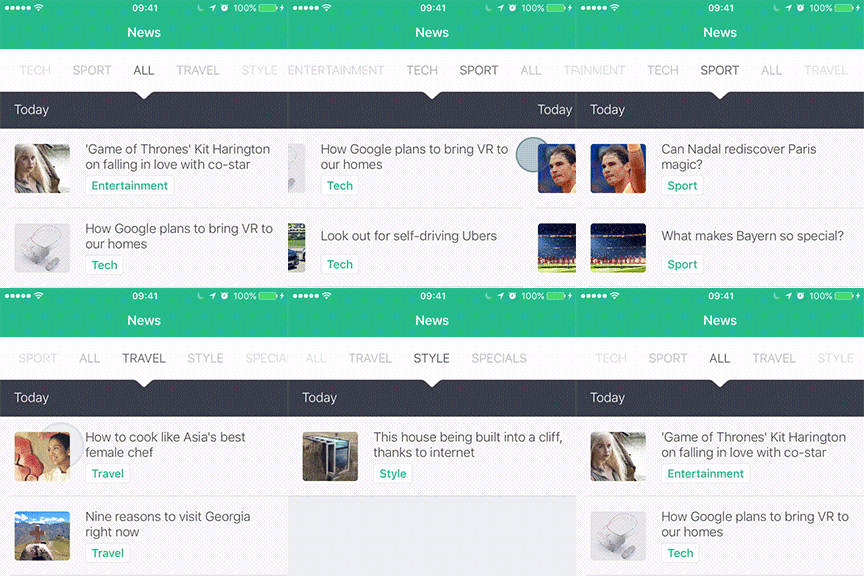
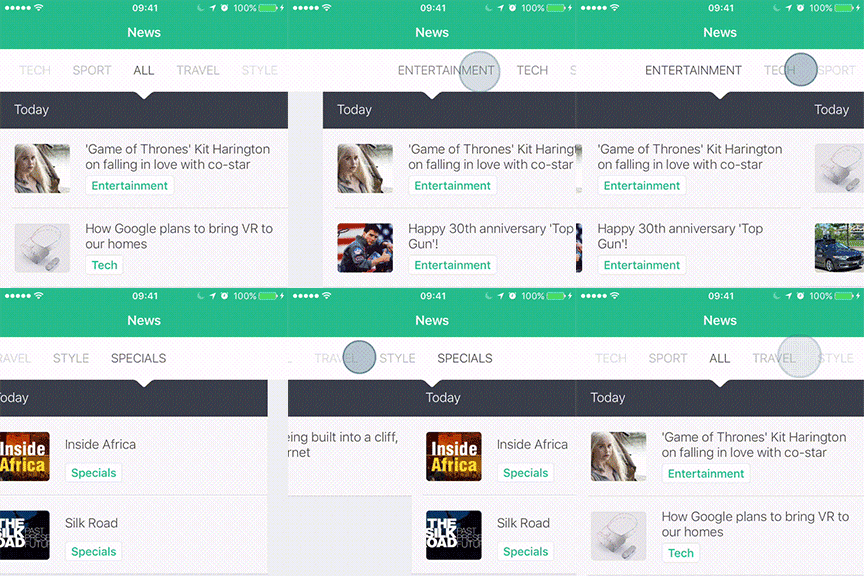
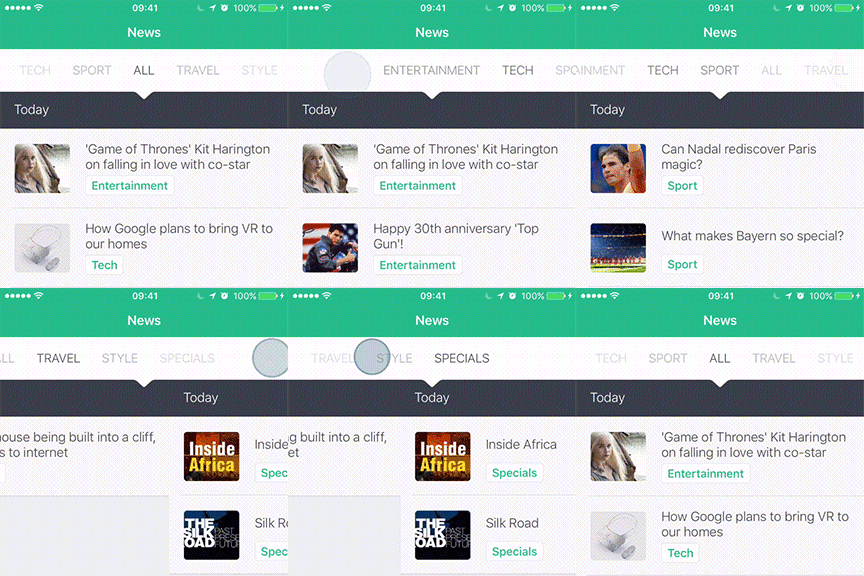
User can interact with the UI by some different gestures. The tabs and pages will always scroll synchronously.
-
Swipepages normally -
Dragtabs can quickly move pages -
Clicka tab to change to that page
You can also use changePageToIndex method to scroll pages programmatically.
Usage
Add an Object of ACTabScrollView
将 UIView 对象拖动到 Interface Builder 上,并将 Class 设置为在 XIB 或 Storyboard 中扩展 ACTabScrollView。
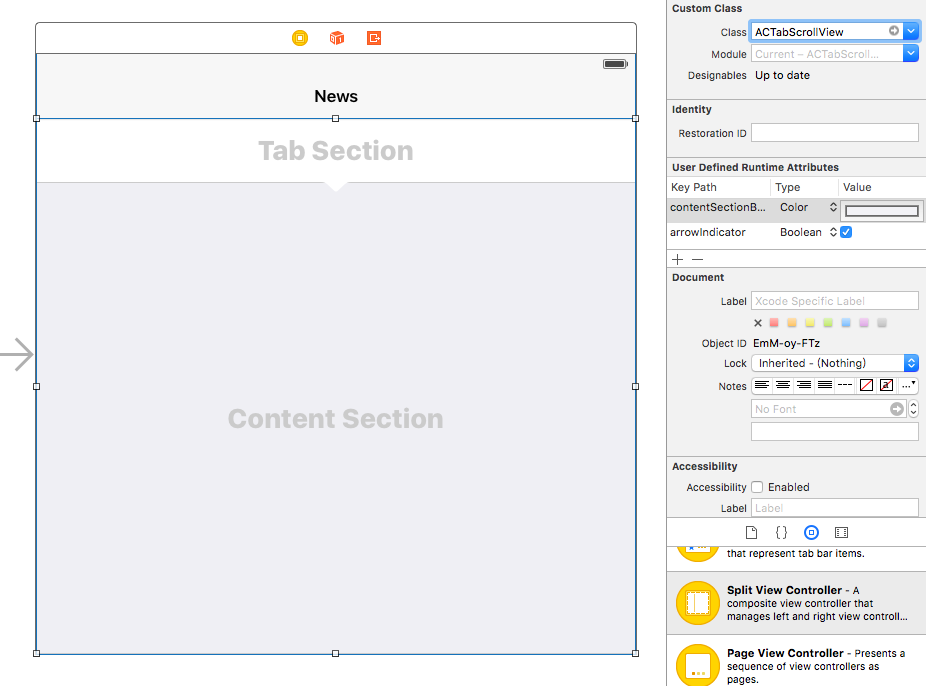
您也可以在 Interface Builder 中设置属性。
并记得声明 IBOutlet。
@IBOutlet weak var tabScrollView: ACTabScrollView!Set Properties
所有以下属性都是 可选的。它提供了更多的自定义灵活性。但如果您不能更改任何属性,那也可以。
override func viewDidLoad() {
    super.viewDidLoad()

    // all the following properties are optional
    tabScrollView.defaultPage = 3
    tabScrollView.arrowIndicator = true
    tabScrollView.tabSectionHeight = 40
    tabScrollView.tabSectionBackgroundColor = UIColor.whiteColor()
    tabScrollView.contentSectionBackgroundColor = UIColor.whiteColor()
    tabScrollView.tabGradient = true
    tabScrollView.pagingEnabled = true
    tabScrollView.cachedPageLimit = 3

    ...
}
Delegate and DataSource
首先在 viewDidLoad() 中设置 Delegate 和 DataSource,它们的用法类似于 UITableView。
override func viewDidLoad() {
    ...

    tabScrollView.delegate = self
    tabScrollView.dataSource = self

    ...
}
在 viewDidLoad() 中准备所有内容视图可能是一个好主意。我们最好不要在每次页面更改时创建内容视图,因为这可能引起性能问题。
override func viewDidLoad() {
    ...

    // create content views from storyboard
    let storyboard = UIStoryboard(name: "Main", bundle: NSBundle.mainBundle())
    for i in 0 ..< /* number of pages */ {
        let vc = storyboard.instantiateViewControllerWithIdentifier("ContentViewController") as! ContentViewController

        /* set somethings for vc */

        addChildViewController(vc) // don't forget, it's very important
        contentViews.append(vc.view)
    }

    ...
}
并实现方法
// MARK: ACTabScrollViewDelegate
func tabScrollView(tabScrollView: ACTabScrollView, didChangePageTo index: Int) {
    print(index)
}

func tabScrollView(tabScrollView: ACTabScrollView, didScrollPageTo index: Int) {
}

// MARK: ACTabScrollViewDataSource
func numberOfPagesInTabScrollView(tabScrollView: ACTabScrollView) -> Int {
    return /* number of pages */
}

func tabScrollView(tabScrollView: ACTabScrollView, tabViewForPageAtIndex index: Int) -> UIView {
    // create a label
    let label = UILabel()
    label.text = /* tab title at {index} */
    label.textAlignment = .Center

    // if the size of your tab is not fixed, you can adjust the size by the following way.
    label.sizeToFit() // resize the label to the size of content
    label.frame.size = CGSize(
        width: label.frame.size.width + 28,
        height: label.frame.size.height + 36) // add some paddings

    return label
}

func tabScrollView(tabScrollView: ACTabScrollView, contentViewForPageAtIndex index: Int) -> UIView {
    return contentViews[index]
}
使用教程已完成,您可以在 ACTabScrollView/NewsViewController.swift 中查看更多详细信息和示例。
Using ACTabScrollView in Objective-C Project
如果您使用的是最新版本的 Xcode,则非常简单。
首先,在您的 .m 文件中导入自动生成的头文件 ACTabScrollView-Swift.h。
#import "ACTabScrollView-Swift.h"这个头文件是自动生成的,您不需要更改任何设置。
并在您的 ViewController.m 中尝试使用 ACTabScrollView。
#import "ViewController.h"
#import "ACTabScrollView-Swift.h"

@interface ViewController ()
@end

@implementation ViewController

- (void)viewDidLoad {
    [super viewDidLoad];

    ACTabScrollView *tabScrollView = [[ACTabScrollView alloc] init];

    tabScrollView.defaultPage = 3;
    tabScrollView.arrowIndicator = true;
}

@end
在 Objective-C 项目中使用 ACTabScrollView,享受其中的乐趣。
如何安装
手册
将这两个文件拖入您的项目。
Sources/ACTabScrollView.swiftSources/ACTabScrollView+Protocol.swift
您即可使用 ACTabScrollView。
灵感来源
Stackoverflow 问题激发了我建立这个库。虽然 ACTabScrollView 没有实现问题中提到的所有功能,例如 无限滚动,但我将依然继续实现。但这个想法给了我动力去做这件事,并将 ACTabScrollView 带到这里。
我将那个问题中的 UI 作为本项目的示例,因为这最好地展示了这个概念,仅作示例。我一直想知道 app 是什么,但还没弄明白。
如果您创建了 app 并不希望我使用它作为示例,请联系我,我将立即移除。或者我可以在 README 和示例文件中提及您和您的作品。非常感谢!
许可
MIT 许可协议 (MIT)
版权所有 © 2016 Azure Chen
任何人免费获得此软件及相关文档文件的副本(“软件”),可以在没有限制的情况下处理该软件,包括但不限于使用、复制、修改、合并、发布、分发、再许可以及出售软件复制品,并可允许向软件提供者提供之任何人这样做,前提是遵守以下条件
以上版权声明和本许可声明应包含在软件的任何副本或主要部分中。
软件按“原样”提供,除非另有说明,没有任何形式的保证,无论明示或暗示,包括但不限于适销性、特定用途适合性和非侵权性保证。在任何情况下,作者或版权所有者均不对任何索赔、损害或其他责任承担责任,无论是在合同诉讼、侵权诉讼或其他诉讼中,无论该索赔、损害或其他责任是由于软件或其使用或其他方式引起的。